Windows 10/11 app. Every feature on up to 10 images, no watermark, no card.
Your download is starting…
Open the RassioForge-Setup file in your Downloads folder. If Windows shows “Windows protected your PC”, click More info, then Run anyway: the installer is new, so SmartScreen doesn’t know it yet.
We'll only email you about Rassio Forge updates. Unsubscribe any time.
Print prep software for wall art sellers · Windows
Type the canvas size. Get a print file ready to stretch.
Rassio Forge builds the exact canvas print file from one artwork: wrapped edges, fold and staple marks, hanging points and a DPI check, scaled for your canvas shrink. Triptychs and collages too. Then it batches every poster size you sell.
Getting art ready for the printer is the job nobody signed up for
One new design should take minutes to print. Instead it eats your evening.
01
Canvas wraps done by eye
Bleed, depth and mirror edges measured by hand, one canvas at a time. Get the depth wrong and the image folds over the frame.
02
Triptychs cut by hand
Splitting one artwork into 3 panels means guides, maths and three exports, and the gap between panels never lines up on the wall.
03
Blurry prints found too late
A 60×90 that looked fine on screen comes back soft. You find out after the print, the frame and the refund.
04
The framer has to guess
No fold lines, no staple marks, no hanging points. Every canvas gets measured again at the stretching table.
05
Canvas shrinks after stretching
Material pulls a few millimetres and the face comes out short. Fixing it means resizing every file by hand.
06
Every size, by hand
One design, ten poster sizes: open, crop, resize, export, repeat. Every new drop multiplies the work.
The fix
One screen replaces the whole evening
By hand
Wraps and bleed measured by hand
DPI checked by guesswork
Panels and collages cut in Photoshop
Framer re-measures every canvas
vs
With Rassio Forge
Wrap, fold and staple marks drawn for you
Effective DPI shown before you print
7 panel layouts and 7 collage templates
Hanging points and labels on the file
Print prep first, posters too
From one artwork to a print-ready canvas
01
02
03
04
05
Pro
output/300 DPI
artwork_30x40cm_crop.tiff
artwork_45x60cm_crop.tiff
artwork_50x70cm_crop_rtp.tiff
artwork_12x16in_crop.png
artwork_A2_crop.pdf
01
Step 1: Print prepPro
Exact canvas sizes, down to the millimetre
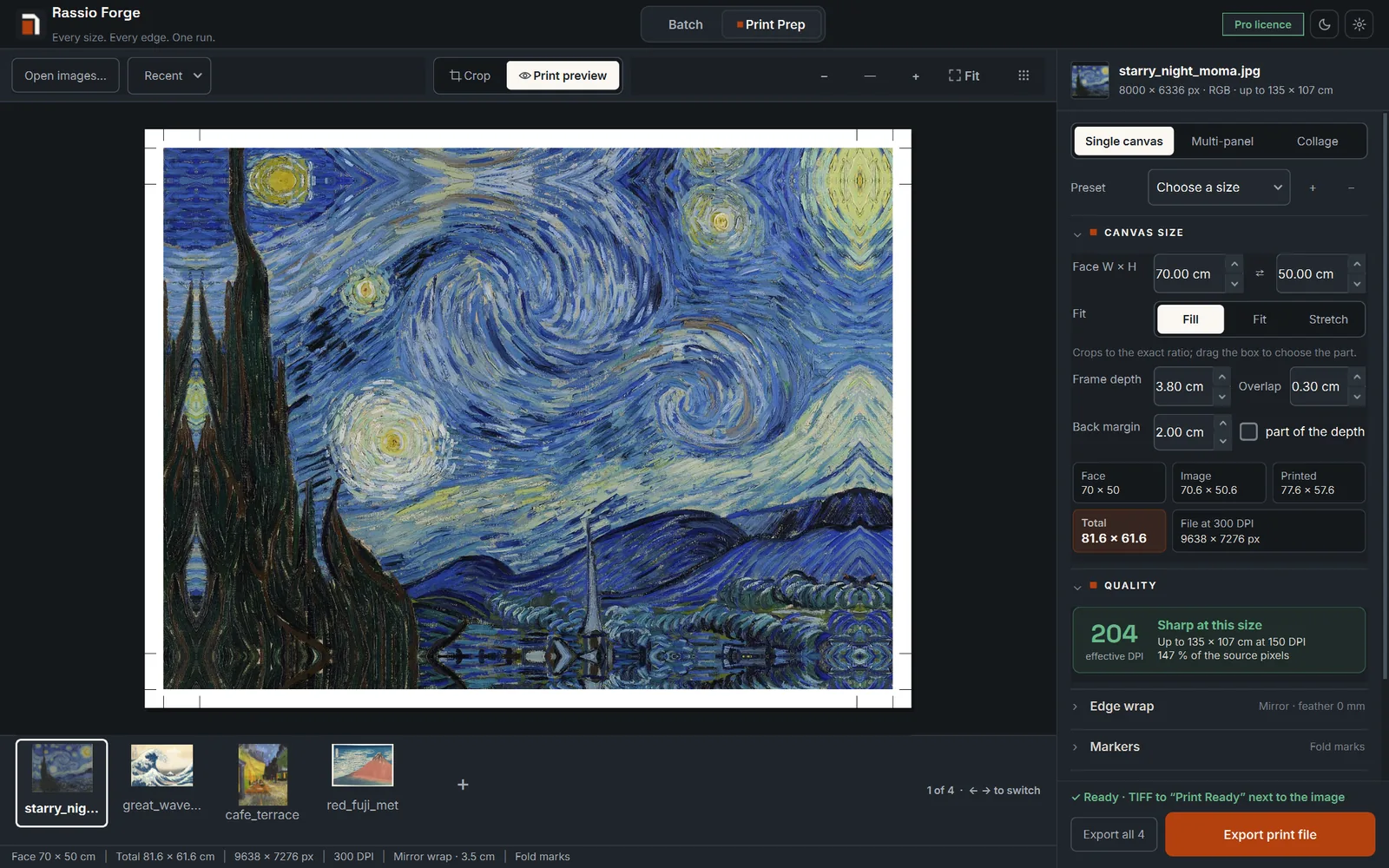
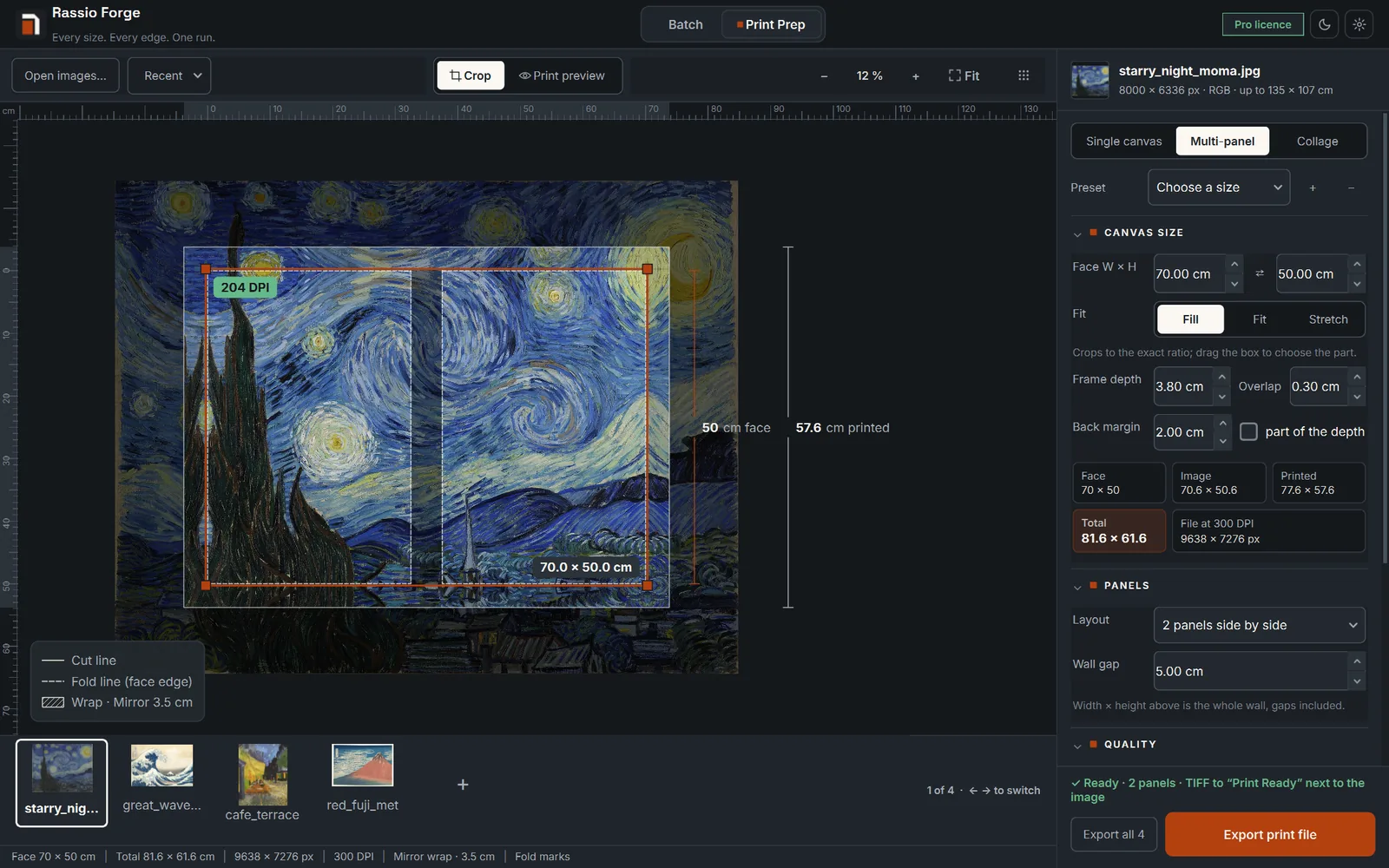
Type the face in mm, the frame depth, the overlap and a back margin for staples and your label. Fill, fit or stretch the artwork, and read the effective DPI with a clear verdict before anything prints.
Everything the framer needs is on the file
Fold and cut lines Fold marks, the cut line and the image edge, plus a TOP arrow so nobody stretches it upside down.
Staple marks Evenly spaced staple points on the back margin, at the spacing you set.
Hanging points One in the centre, or two at ¼ and ¾, with 1 or 2 screws and the spacing printed beside the mark.
Edge labels File name, date, format, DPI, artist credit or the order number, in the top or bottom margin.
Your logo on the back Place your logo in the back margin and set its size and opacity.
Shrink calibration Canvas pulls when it is stretched. Enter the shrink in X and Y and every file is scaled to match.
Up to 1200 DPI Any DPI from 72 to 1200, in TIFF, JPEG, PNG or PDF, saved to a Print Ready folder.
Set once, apply to all Save presets, apply one setup to every image, then Export all with Ctrl+Shift+E.
02
Step 2: Selling posters too? Drop them in
Then batch every poster size
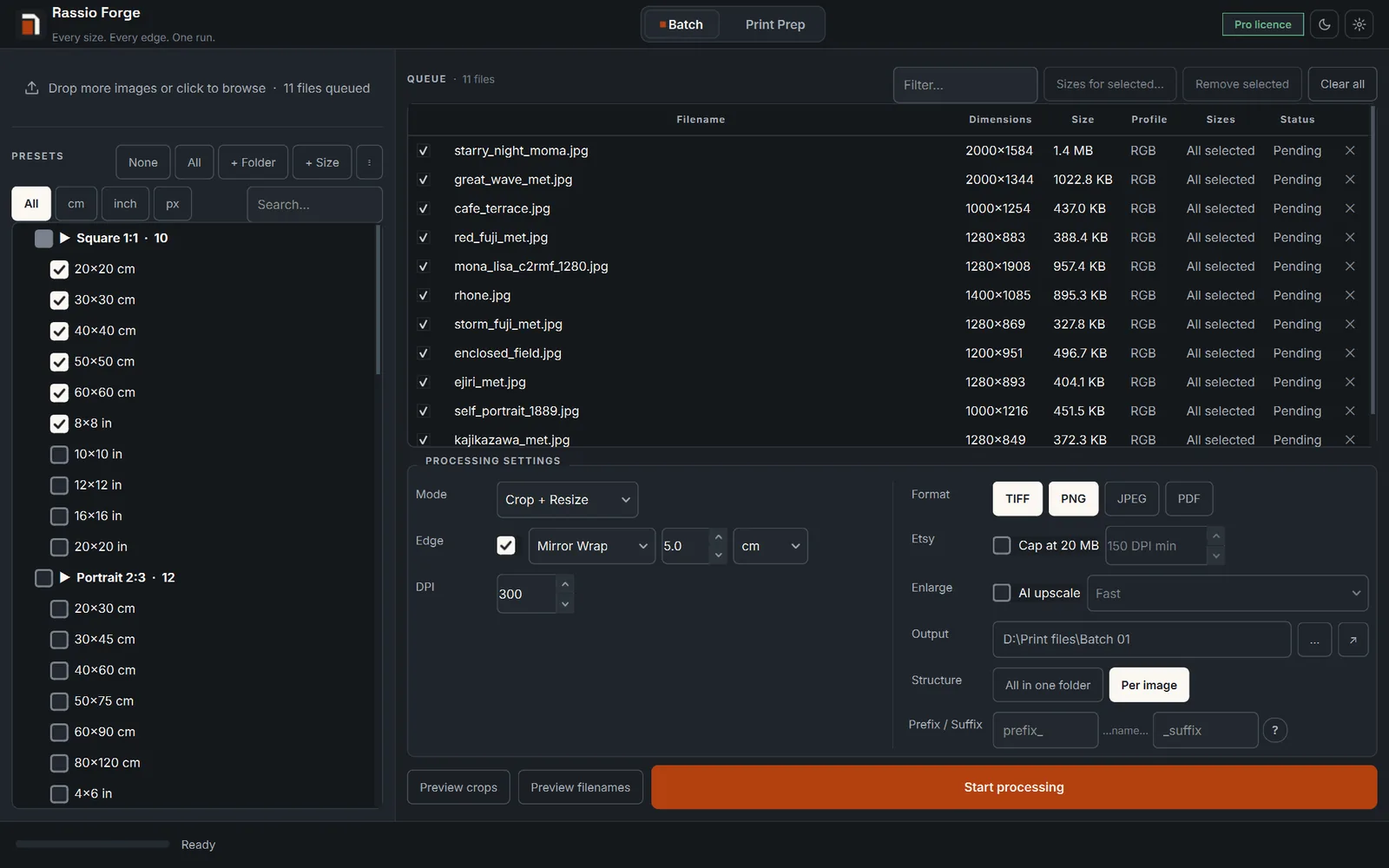
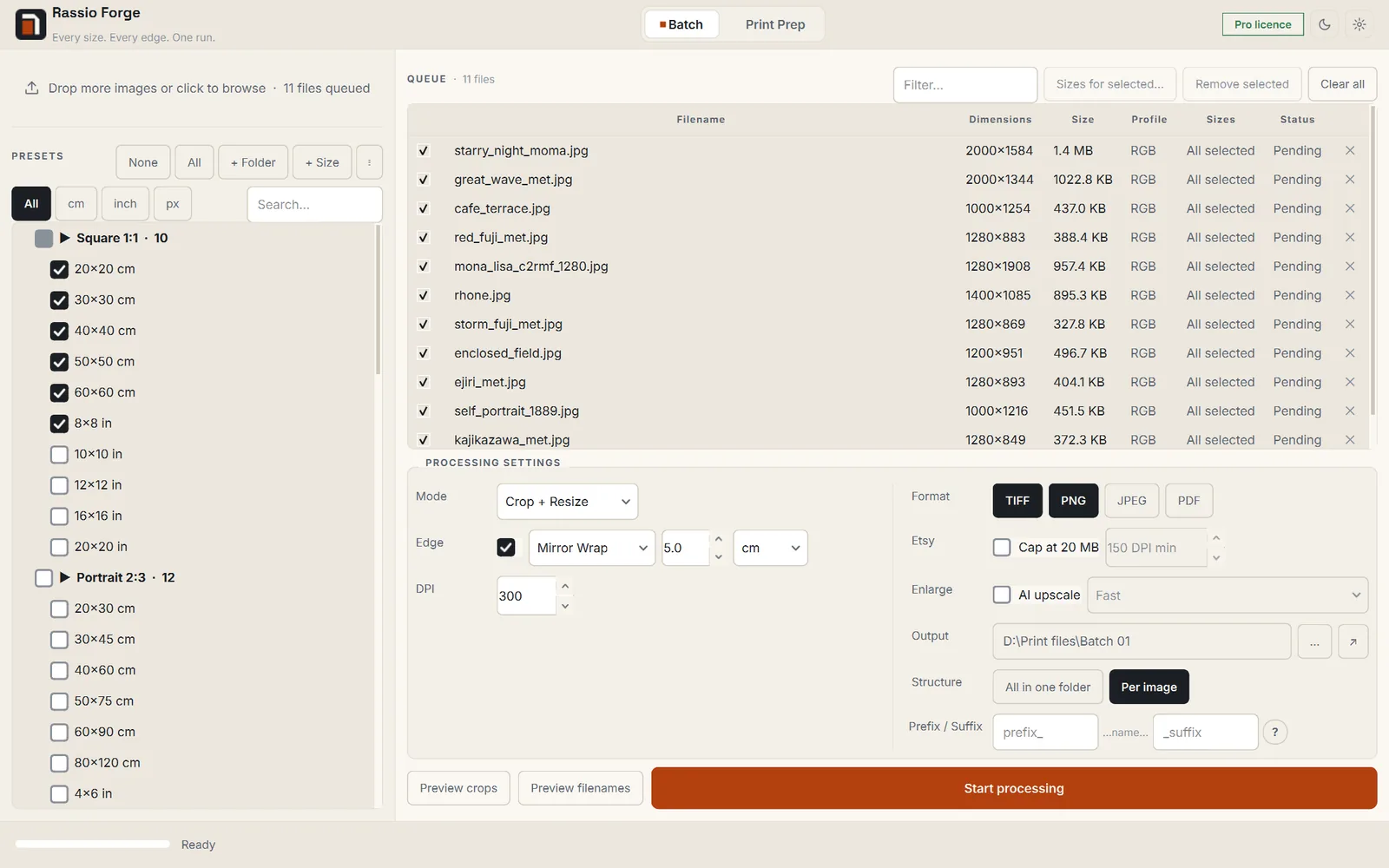
57 presets in 7 ratio families, in cm and inches, plus your own sizes. Queue a hundred images, tick what you sell, press Start.
Mirror The border reflects the image, so nothing on the face is lost.
Gallery The image itself wraps around the frame.
Colored A solid edge in any colour you pick.
Blurred A soft, stretched edge that follows the image colours.
04
Step 4: Pick format & naming
Print-ready output, named your way
TIFF, PNG, JPEG or PDF at 300 DPI, file-name templates, and one folder or one per image.
TIFF
PNG
JPEG
PDF
05
Step 5: Press Start
A whole collection in one run
Every image is processed on your PC. Nothing is uploaded, ever.
output/300 DPI
artwork_30x40cm_crop.tiff
artwork_45x60cm_crop.tiff
artwork_50x70cm_crop_rtp.tiff
artwork_12x16in_crop.png
artwork_A2_crop.pdf
Print prep Pro
For wall art sellers who print, stretch and frame: exact canvases, wraps, panels and collages.
Five wraps, previewed before you print
Mirror, solid colour, stretch, average colour or a true image wrap, with a feather that blends the art into the edge. The preview shows the face, the wrap and every fold mark.
Triptychs and multi-panel sets
2, 3, 4 or 5 panels side by side, 2 stacked, 2×2 or 3×3. Set the wall gap and Forge works out each panel and its wrap, so the set lines up on the wall.
Collages in one file
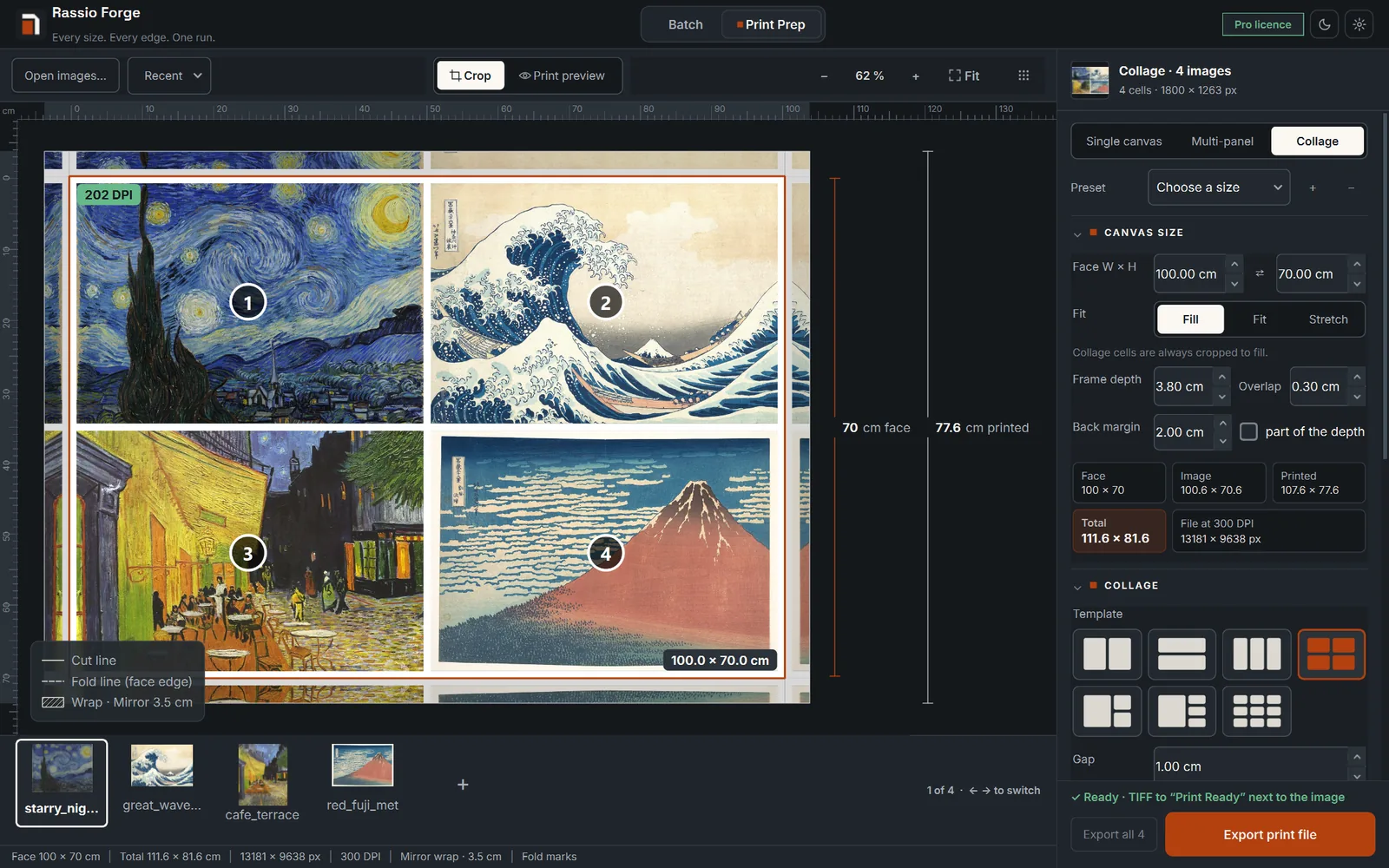
Seven templates, from 2 side by side to 1 large + 3 and 3×3. Pick an image per cell or auto-fill in order; each one is cropped to fill its cell, with the gap and gap colour you choose.
Mirror, solid colour, stretch, average colour, image wrap
Print marks
Fold, cut, staple, hanging points, edge labels
Layouts
7 multi-panel + 7 collage templates
Sizes
57 presets in 7 families + custom cm / in / px
Batch edges
Mirror, gallery, colored, blurred
System
Windows 10 / 11, 64-bit
Privacy
Files never leave your PC
Offline
Works up to a week between licence checks
For Etsy digital-download sellers
One artwork in, every printable size out
Printable buyers expect every common frame size in the download. Forge cuts the whole set from one file, so a new listing is a queue, not an evening of cropping.
4×6 in
8×10 in
11×14 in
12×16 in
16×20 in
18×24 in
24×36 in
A4
A3
A1
artwork/300 DPI
artwork_4x6in_crop.jpeg
artwork_8x10in_crop.jpeg
artwork_11x14in_crop.jpeg
artwork_12x16in_crop.jpeg
artwork_24x36in_crop.jpeg
artwork_A1_crop.pdf
01
Every ratio from one file
Tick 2:3, 3:4, 4:5, square and ISO A once. Forge crops one high-resolution artwork to every size, from 4×6 in to 24×36 in and A4 to A0.
02
A whole collection in one run
Queue a hundred artworks, tick your sizes and press Start. Forge works through the queue while you write your listings.
03
300 DPI on every file
Each size is saved at 300 DPI, in JPEG, PNG, TIFF or PDF, ready for a home printer or a print shop.
04
Names buyers understand
A file-name template puts the size in every name, so a buyer finds 16×20 in without opening each file.
05
One folder per artwork
Save to one folder, or one folder per image, ready to upload to your listing or behind the link in your download PDF.
06
Your designs stay private
Everything runs on your own PC. Nothing is uploaded, so unreleased designs stay yours.
Only selling printables? The Automation edition does all of this from $9 a month.
Two editions · Which one am I?
Pick the edition that matches your shop
“I’m the seller who…”
For sellers who only need every poster size, fast.
Automation
Poster batch
from$9/monthor $81/year
57 size presets + custom sizes
TIFF / PNG / JPEG / PDF at 300 DPI
File-name templates and folders
Mirror, gallery, colored, blurred edges
Recommended
“I’m the seller who…”
For wall art sellers who print, stretch and frame: exact canvases, wraps, panels and collages.
Pro
Print prep + batch
from$17/monthor $153/year
Exact canvas sizes in mm with a DPI check
5 edge wraps with a live preview
7 panel layouts and 7 collage templates
Fold, staple and hanging-point marks
Edge labels and your logo on the back
Shrink calibration, output up to 1200 DPI
Everything in Automation
Not sure? The free trial processes 10 images with every feature. No card needed.
How buying works
From checkout to your first print file in minutes
1
Pick a plan
Monthly, yearly (3 months free) or a one-time $299 licence. Secure checkout by Stripe.
2
Check your inbox
Your account credentials arrive by email within a minute of payment.
3
Sign in and download
Download the installer and copy your licence key from your account.
4
Activate on your PC
Paste the key once. It runs on 1 PC and moves to a new one from your account.
Pricing
Plans and pricing
Buying opens very soon. Meanwhile, the free trial gives you every feature on 10 images, no card needed.
Automation · Poster batch
$81/ year
Pay 9 months, get 12 — $6.75/mo Every poster size you sell, exported from one batch.
Every ratio and size in one run
Mirror, gallery, colored or blurred edges
TIFF, PNG, JPEG or PDF output
Your own file naming
1 PC licence — move it any time
Updates while your plan is active
Recommended
Pro · Print prep + batch
$153/ year
Pay 9 months, get 12 — $12.75/mo Print-ready canvases, panels and collages, plus every poster size.
Exact canvas sizes in mm with a DPI check
5 edge wraps, 7 panel layouts, 7 collages
Fold, staple and hanging-point marks
Shrink calibration, output up to 1200 DPI
Everything in Automation
1 PC licence — move it any time
Updates while your plan is active
Lifetime licence
Pro, paid once.
The full Pro edition with every future update. No renewals, ever.
Everything in Pro
All future updates
1 PC licence — move it any time
$299one-time
30-day money-back guarantee
Secure checkout by Stripe
1 computer at a time, transferable
Login and key emailed in a minute
Prices in USD. Taxes may apply at checkout. Monthly and yearly plans renew automatically until you cancel.
Why it is safe to try
Your files stay yours
Every image is processed on your PC. Nothing is uploaded, ever.
30-day refund
If it doesn’t save you time, email us within 30 days for a full refund.
Try before you pay
The free trial processes 10 images with every feature. No card needed.
Secure checkout
Payments run through Stripe. We never see your card number.
FAQ
Questions before you start
How do I get the app after I pay?
Within a minute you receive an email with your login. Set a password, open your account, download the installer and copy your licence key. Paste the key into the app and you are ready.
Automation or Pro — which one do I need?
Automation exports every ratio and size you sell from one batch. Pro adds Print Prep: one exact size with a DPI check, multi-panel splits and collages, and a print preview with the wrap. If you print, frame or sell canvas yourself, take Pro.
I already use Photoshop actions. Why switch?
Keep them if they work for you. An action resizes; Forge builds the canvas file from your measurements: the face in mm and the frame depth, the wrap, fold, staple and hanging marks, shrink calibration, and triptychs split with the wall gap. Photoshop doesn’t need to be open. Run 10 of your own images through the free trial and compare.
My print partner already wraps the canvas. Do I need Pro?
Probably not. If a lab or print-on-demand service does the wrap, the Automation edition covers what you need: every poster and printable size from one batch. Pro is for sellers who print, stretch or frame canvases themselves.
How many computers can I use?
One computer at a time. Changing PC? Deactivate the old one from your account, then activate the new one in one click.
How does the yearly plan give 3 months free?
A yearly plan costs 9 times the monthly price, so you pay for 9 months and get 12.
What is the Lifetime licence?
One payment of $299 for the Pro edition, including every future update. No renewal, ever.
Can I get a refund?
Yes. If Rassio Forge is not right for you, email us within 30 days of your first payment and we refund you in full.
Is there a free trial?
Yes. Download the app and process up to 10 images free — no card needed.
Does it upload my files anywhere?
Never. Everything runs on your PC, so your artwork never touches a server. The app only goes online to check your licence, and it keeps working offline for up to a week.
Which computers does it run on?
Windows 10 and 11, 64-bit. It is a standalone app: no Python, no plugins, nothing else to install.
Which sizes and formats are included?
57 presets in 7 families (square, 2:3, 3:4, 4:5, ISO A, 3:2 and 2:1) in centimetres and inches, plus your own sizes in cm, inches or pixels. It reads JPG, PNG, TIFF, BMP, WebP and PSD, and writes TIFF, PNG, JPEG or PDF at 300 DPI.
What happens if I cancel a plan?
Every file you made stays yours. The app stops processing new batches at the end of the period you paid for, until you renew.
Run your next canvas through Forge. 10 images free, no card.
Every feature works in the trial, on your own PC. Nothing is uploaded and there is nothing to cancel.